Marketplace Scraper
Note: Set your target location directly using Facebook Marketplace's left sidebar filter before scraping.
Scrape History
No scrapes found.
Bulk post, scrape, and manage your Marketplace listings in seconds. Import from Excel, auto-fill every field, and post with human-like behavior.
Install in one click. Your 24-hour free trial starts automatically — no key or email needed.
Add to Chrome — FreeNo credit card required • Uninstall anytime
Manage hundreds of listings from a single popup. Import, queue, and auto-post — all without leaving your browser.

No scrapes found.
See exactly what you get — no mockups, no renders. These are real screenshots from the extension in action.
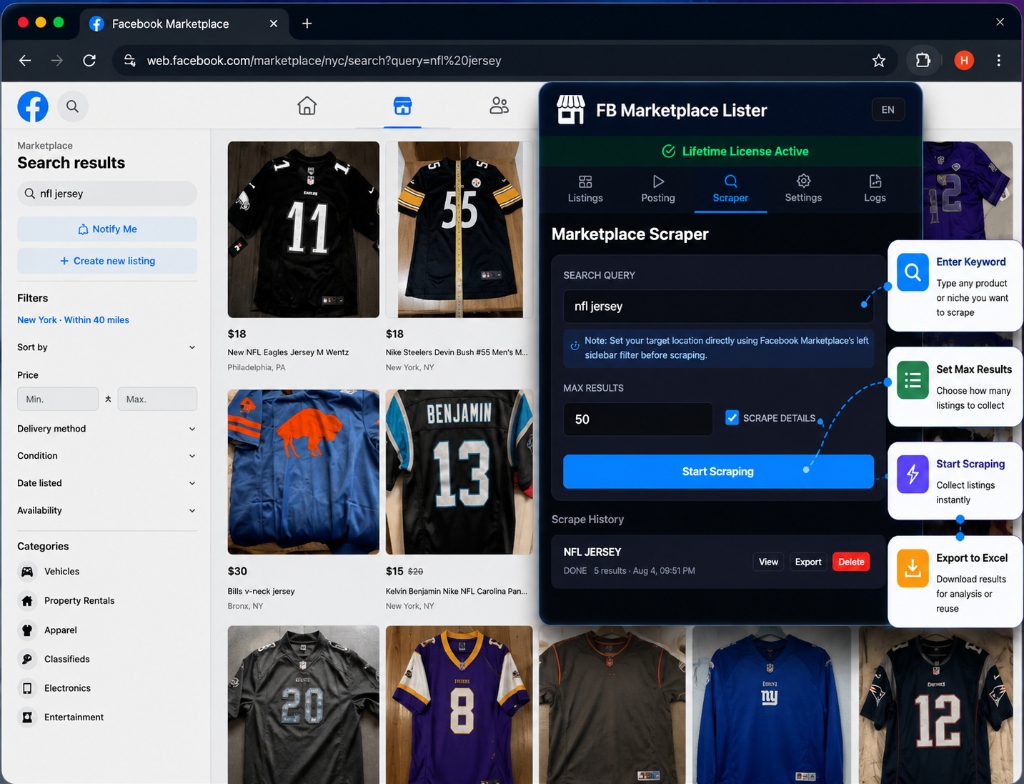
Search any keyword on Facebook Marketplace, set max results, scrape full details including prices & images, then export everything to Excel with one click.
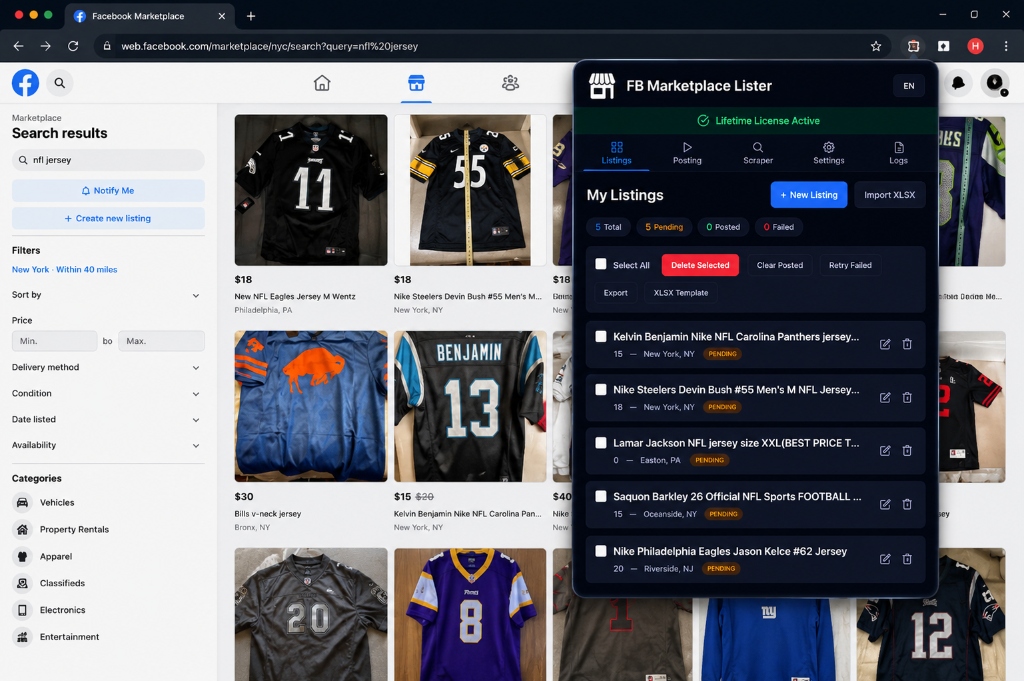
Manage all your listings in one place. Import from Excel, create new items, and track posting status — Pending, Posted, or Failed — in real-time.
Download your scraped results as a perfectly formatted .xlsx file containing Titles, Prices, Descriptions, Image URLs and more. Edit in bulk, then re-import to post!
| A | B | C | D | E | F | G | H | I | J | K | L | M | N | O | |
|---|---|---|---|---|---|---|---|---|---|---|---|---|---|---|---|
| 1 | Title | Description | Price | Location | Tags | Listing URL | Image 1 URL | Image 1 Path | Image 2 URL | Image 2 Path | Image 3 URL | Image 3 Path | Image 4 URL | Image 4 Path | Image 5 URL |
| 2 | Nike NFL Jersey | New Nike NFL Jersey... | 40 $US | East Haven, CT | https://web.f... | https://scont... | C:\Users\Mo... | https://scont... | C:\Users\Mo... | https://scont... | C:\Users\Mo... | https://scont... | C:\Users\Mo... | ||
| 3 | Randy Moss... | Free Storage... | 25 $US | Woodhaven, NY | https://web.f... | https://scont... | C:\Users\Mo... | https://scont... | C:\Users\Mo... | https://scont... | C:\Users\Mo... | https://scont... | C:\Users\Mo... | https://scont... | |
| 4 | NFL JERSEY | NFL Replica... | 20 $US | Nutley, NJ | https://web.f... | https://scont... | C:\Users\Mo... | https://scont... | C:\Users\Mo... | https://scont... | C:\Users\Mo... | ||||
| 5 | |||||||||||||||
| 6 |
Note: When importing your listings, ensure you define the following columns in your spreadsheet so the extension can successfully auto-fill your Marketplace listings:
Category, Condition, Availability, Tags, SKU, Location, and Groups.
| A | B | C | D | E | F | G | H | I | J | K | L | M | |
|---|---|---|---|---|---|---|---|---|---|---|---|---|---|
| 1 | Title | Description | Price | Category | Condition | Availability | Tags | SKU | Location | Groups | Image 1 Path | Image 2 Path | Image 3 Path |
| 2 | iPhone 15 Pro Max | Brand new sealed... | 999 | electronics | new | in stock | iphone,apple... | SKU-001 | New York, NY | Buy and Sell NYC... | C:\images\img1.jpg | C:\images\img2.jpg | |
| 3 | Sony WH-1000XM5 | Noise cancelling... | 250 | electronics | used_like_new | in stock | sony,headphones | SKU-002 | Boston, MA | Marketplace US | C:\images\sony1.jpg | C:\images\sony2.jpg | C:\images\sony3.jpg |
| 4 | |||||||||||||
| 5 |
From scraping competitors to bulk posting your own inventory — all automated, all from one extension.
Queue up hundreds of listings and let the extension post them one by one, filling every field automatically with human-like typing speed.
Search any keyword on Marketplace, scrape all results with full details (title, price, images, description, location), and export to Excel.
Import listings from Excel spreadsheets and export scraped data with all images downloaded to your computer. Full round-trip workflow.
Scrape all gallery images from listings, and upload multiple photos per listing when posting. Supports up to 20 images per item.
Random delays, natural typing speed, and realistic mouse movements. The extension mimics real human interaction to keep your account safe.
Set custom locations for each listing. Target specific cities and neighborhoods to reach the right buyers in the right area.
Add FB Marketplace Lister to Chrome from the Web Store. Your 24-hour free trial starts automatically — no key or email needed.
Upload your Excel spreadsheet with product titles, prices, images, and descriptions — or scrape them from Marketplace.
Hit "Start" and the extension handles everything: uploading photos, filling forms, clicking buttons — all automatically.
No subscriptions, no hidden fees. Pay once and own it forever.
Install the extension and your free trial starts automatically — full access to every feature for 24 hours, no email, key, or credit card required. When the trial expires, you can upgrade to lifetime access.
It's a one-time payment of $75. You get lifetime access — no recurring charges, no hidden fees. All future updates are included for free. Prefer to start smaller? Try the free 24-hour trial or go monthly for $9.
Search any keyword on Facebook Marketplace, and the scraper will automatically collect every listing's title, price, description, location, multiple images, and tags. You can then export everything to an Excel file with all images downloaded to your computer.
Yes! Download the template spreadsheet from the extension, fill in your product data (title, price, images, description, category, location), and import it. The extension will queue all your listings and post them one by one. You can add multiple images per listing using separate columns (Image 1, Image 2, etc.).
The extension uses human-like delays, natural typing speeds, and realistic interaction patterns. It does not use Facebook's API or violate rate limits. Each action mimics what a real person would do, with randomized timing to stay under the radar.
The extension works on Google Chrome and Chromium-based browsers (Edge, Brave, Opera). The interface supports both English and French, and the scraper/poster handles Facebook pages in any language.